Backlinks remain one of the strongest ranking factors in SEO—but in 2025, link quality matters far more than link quantity. While authoritative backlinks can boost visibility, toxic or spammy backlinks can silently damage rankings, credibility, and even trigger Google penalties.
If you’re searching for how to disavow backlinks, this guide explains exactly when to use Google’s Disavow Tool, when to avoid it, and how to do it safely—without harming your SEO.
How to Disavow Backlinks (Quick Answer)
To disavow backlinks, you must identify toxic links pointing to your website, attempt manual removal, create a properly formatted disavow file, and submit it through Google Search Console. This tells Google to ignore those links when evaluating your site’s rankings.
What Does It Mean to Disavow Backlinks?
Disavowing backlinks means asking Google to ignore specific inbound links when assessing your website. This helps protect your site from links that are spammy, manipulative, or harmful.
Google provides a Disavow Tool inside Search Console, but it should be used with caution. Disavowing the wrong links can weaken your backlink profile and negatively impact rankings.
Why Are Toxic Backlinks Harmful?
Toxic backlinks usually come from low-quality or untrustworthy websites created to manipulate rankings. These links signal risk rather than authority.
Common sources of toxic backlinks include:
- Spam directories and automated listing sites
- Link farms or private blog networks (PBNs)
- Websites flagged for malware or phishing
- Irrelevant or low-authority blogs
- Over-optimized anchor text patterns
When these links accumulate, Google may view them as unnatural link building, which can result in ranking drops or manual penalties.
When Should You Disavow Backlinks?
Disavowing backlinks should never be your first step. In most cases, Google ignores low-quality links automatically.
You should consider disavowing backlinks only when:
- You’ve received a manual action for unnatural links
- Your rankings dropped suddenly and spam links increased
- Your site was targeted by a negative SEO attack
- A backlink audit reveals risky links that cannot be removed
Important:
If your site has no manual penalty and no history of manipulative link building, disavowing backlinks may do more harm than good
How Google Handles Toxic Backlinks in 2025
In 2025, Google’s algorithms are far better at ignoring random low-quality links automatically. However, disavowing backlinks is still necessary when:
- Link patterns look intentionally manipulative
- Anchor text is heavily over-optimized
- Spam links appear at scale
- Manual actions are involved
Knowing how to disavow backlinks correctly is critical—especially for sites recovering from penalties or aggressive SEO tactics.
How to Disavow Backlinks: Step-by-Step Guide
Step 1: Audit Your Backlink Profile
Before disavowing anything, conduct a detailed backlink audit.
Recommended tools:
- Google Search Console (free & reliable)
- Ahrefs
- SEMrush
- Moz Link Explorer
- Ubersuggest
Look for backlinks from:
- Low-quality or irrelevant domains
- Foreign sites with no contextual relevance
- Spammy anchor text patterns
- Deindexed or penalized websites
Step 2: Export and Review Backlinks
- Export your backlink data
- Filter by domain authority, spam score, and relevance
- Manually review suspicious links
- Flag links that clearly pose SEO risk
Avoid relying only on tool-generated spam scores—human review is essential.
Step 3: Attempt Manual Link Removal
Google prefers manual removal over disavowing.
What to do:
- Visit the linking site
- Find contact details (email, contact form, WHOIS)
- Politely request link removal
- Maintain a record of your outreach
If removal fails, proceed to disavow.
Step 4: Create the Disavow File
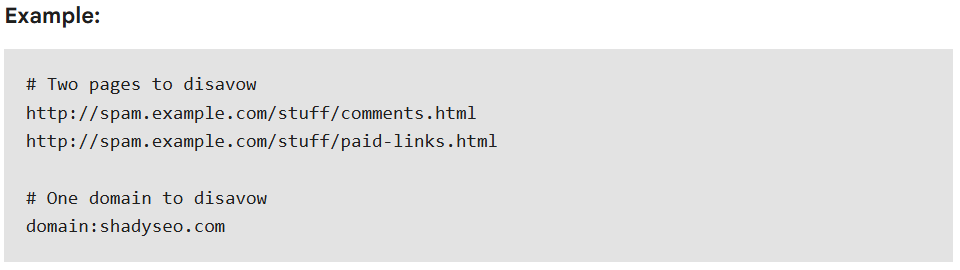
Create a plain text (.txt) file listing the URLs or domains you want Google to ignore.
Example format:
Best practices:
- One URL or domain per line
- Use domain: to disavow entire domains
- No extra formatting or symbols
Step 5: Submit the File in Google Search Console
- Open Google’s Disavow Tool
- Select your verified property
- Upload the .txt file
Google may take several weeks to recrawl and process disavowed links.
Best Practices for Disavowing Backlinks
- Use the Disavow Tool only when necessary
- Always manually review links
- Disavow domains instead of single URLs when possible
- Keep records of audits and removal attempts
- Perform regular backlink audits, especially after updates
What to Avoid When Disavowing Backlinks
- Don’t disavow links solely based on low DA
- Don’t disavow natural or editorial links
- Never use disavow for SEO manipulation
- Avoid mass disavowing without verification
Conclusion
Disavowing backlinks is an advanced SEO technique that can help protect your website from harmful link profiles. When done correctly, it can improve search visibility, recover lost rankings, and restore domain trustworthiness. However, use the disavow tool with care.Need help managing your backlink profile? At Altois, our SEO experts specialize in comprehensive backlink audits and safe disavow strategies that protect your rankings and reputation